


eCommerce shipping includes everything that happens after checkout to get an order to the customer.
You choose rates, carriers, packaging, labels, tracking updates, and a returns flow that stays simple. When you set it up right, you cut costs, reduce damage, and deliver on time more often.
This guide shows you a clear shipping setup you can run day to day. You will learn how shipping costs work, how to pick methods and carriers, how to reduce dimensional weight waste, and how to build tracking and returns that keep customers coming back.
What is eCommerce shipping?
eCommerce shipping is the process of moving an online order from your store to the customer’s address. It starts after you pack the order and hand it to a carrier, but it also includes the choices that make delivery smooth, like packaging, labels, tracking, and returns.
eCommerce shipping includes:
- Shipping rates and methods shown at checkout
- Packaging that protects items and controls cost
- Shipping labels and carrier handoff
- Tracking updates customers can follow
- Delivery exceptions handling
- Returns and exchanges flow
The difference between fulfillment and shipping
Fulfillment covers picking, packing, and preparing the order. Shipping starts when you transfer the packed order to the carrier for delivery.
You can fulfill orders yourself, use dropshipping, or use a 3PL. Your fulfillment model decides how fast you can ship and how much control you keep.
| Item | What it means | Where it starts | What it includes |
| Fulfillment | Getting the order ready to ship | When the order comes in | Inventory check, picking, packing, packing slip, handing off to shipping step |
| Shipping | Moving the packed order to the customer | When you hand the package to the carrier | Shipping label, carrier pickup or drop off, delivery timeline, tracking updates, delivery confirmation |
The end to end shipping flow
Here is a simple shipping flow you can map to your store process.
- Customer places an order
- You confirm inventory and order details
- You pick and pack the items
- You print the shipping label
- You hand the package to the carrier
- You share tracking and delivery updates
- You handle delivery exceptions and returns
Why eCommerce shipping affects sales and retention
Shipping affects sales because it changes what customers see at checkout. High shipping costs, slow delivery times, and unclear promises push people to abandon the cart. Clear rates and realistic delivery dates help customers finish the purchase.
Shipping affects retention because the experience continues after payment. Tracking updates reduce “where is my order” messages and protect trust. A smooth returns process makes customers more likely to buy again after a return.
Shipping problems that cause cart abandonment
These issues cause drop offs at checkout:
- Surprise shipping fees shown late in checkout
- No affordable shipping option
- Delivery promises that sound vague
- Too many shipping choices that confuse buyers
Tracking and returns decide repeat purchase
Customers check tracking often, so updates matter. Sendcloud states shoppers check tracking multiple times per order, which shows why tracking is part of the customer experience, not only operations.
Returns also shape repeat purchase. ShipBob cites research that a positive returns experience increases the chance a customer will buy again.
Turn smooth deliveries into repeat customers — build loyalty after every order with WPLoyalty.
The core parts of an eCommerce shipping strategy
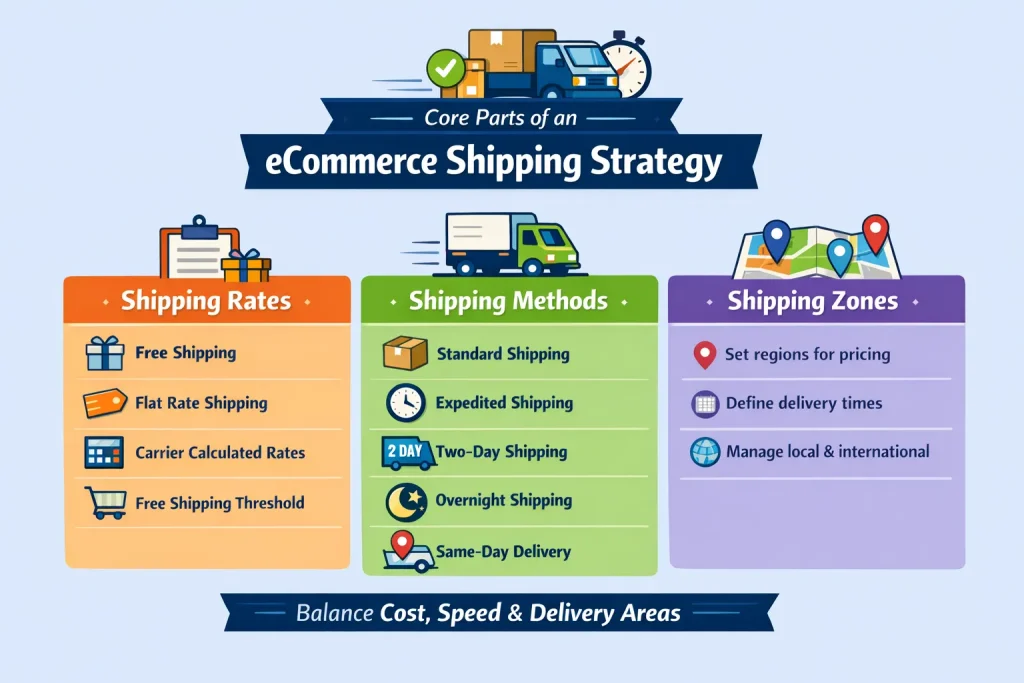
A good eCommerce shipping strategy balances cost, speed, and clarity. You decide what you charge, how fast you deliver, and where you ship before you pick tools. These choices shape conversion, support load, and profit.
Your strategy has three parts: rates, methods, and zones. When you set these right, you avoid surprise costs and missed delivery promises.
Shipping rates you can offer
Pick a pricing model customers understand and you can sustain.
- Free shipping: you price it into products or absorb it from margin
- Flat rate shipping: you charge one fixed rate per order or per zone
- Real time carrier rates: you charge based on live carrier pricing
- Free shipping threshold: you offer free shipping above a cart total to lift average order value
Shipping methods and delivery speeds
Offer a small set of choices so customers decide fast.
- Standard shipping for the best cost and broad coverage
- Expedited shipping for faster delivery than standard
- Two day shipping for speed sensitive customers
- Overnight shipping for urgent orders
- Same day delivery for local areas and local inventory
Shipping zones and where you deliver
Shipping zones group destinations so you can price and promise delivery by region. Zones help you avoid one flat rate that loses money in far locations. They also help you set realistic delivery time windows for each area.
Fulfillment options and when to use each one
Your fulfillment choice decides how fast you ship and how much control you keep. You can ship in house, ship direct from a supplier, or use a 3PL. Each option changes your costs, delivery speed, and customer experience.
Pick the simplest option that meets your delivery promise. Then improve packaging, carrier choice, and tracking before you switch models.
Ship in house
You store inventory and ship orders from your location. This works best when you have low to medium order volume, sell fragile or custom products, or need tight control.
Use in house fulfillment when:
- You ship locally or from one warehouse
- You need custom packing and inserts
- You want direct control of quality checks
Watch these limits:
- Your team spends hours on picking and packing
- Dispatch slows during sales spikes
- Errors increase when volume grows
Dropshipping and ship direct from manufacturer
A supplier ships the order to the customer. This reduces inventory risk, but it can reduce delivery control.
Use ship direct when:
- You want to test products without buying inventory
- Your supplier ships reliably and shares tracking fast
Watch these risks:
- Delivery times vary and you cannot fix it fast
- Split shipments confuse customers
- Quality issues take longer to resolve
Third party logistics and fulfillment providers
A 3PL stores inventory, picks, packs, and ships orders for you. This works well when you want faster delivery through distributed warehouses and you want your team to stop printing labels all day.
Use a 3PL when:
- You ship across regions and want faster delivery
- You want to scale without adding warehouse staff
- You need better carrier rates and routing options
Watch these tradeoffs:
- You pay storage and handling fees
- You lose some packing control
- You need clear rules for returns and restocking
How eCommerce shipping costs work
Shipping cost is not only the label price. Your box size, weight, destination, speed, and carrier surcharges decide the cost. Packaging and reships also add cost that most stores ignore until margins drop.
You lower costs when you control the cost drivers and reduce waste in packaging and returns.
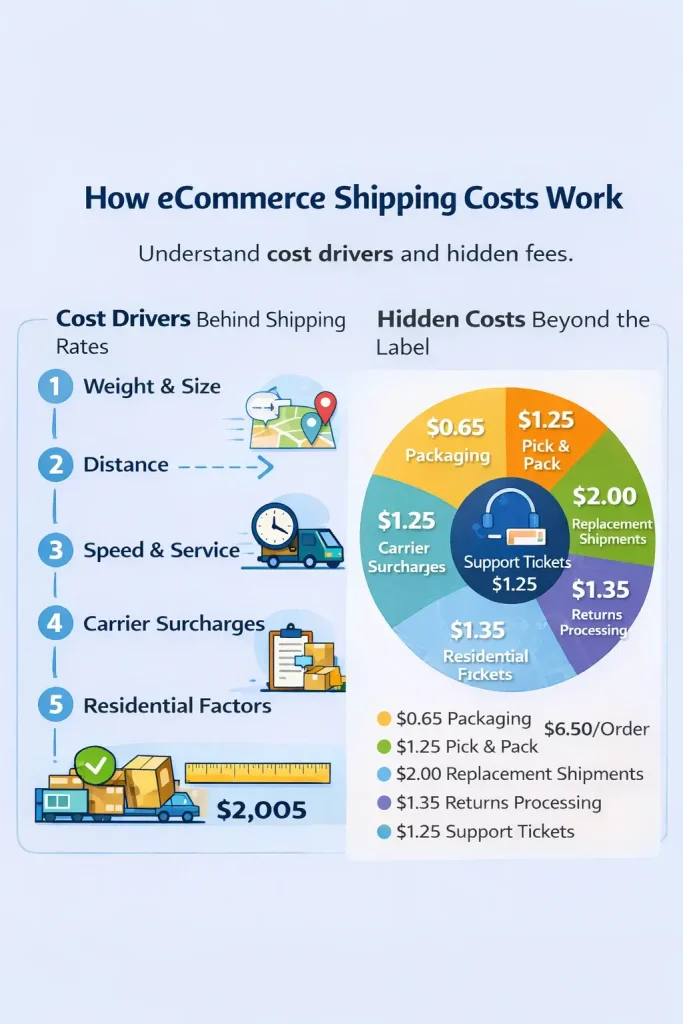
The cost drivers behind shipping rates
These factors decide most ecommerce shipping rates:
- Package weight and size
- Distance and shipping zone
- Delivery speed and service level
- Carrier surcharges and residential factors
Dimensional weight explained simply
Carriers often charge based on whichever is higher: actual weight or dimensional weight. Dimensional weight uses the box size, not the scale weight. A large light box can cost more than a small heavy box.
Example:
- A light jacket in an oversized carton costs more than the same jacket in a right size poly mailer
- You reduce cost by cutting empty space and choosing smaller packaging
Hidden costs beyond the label
Shipping costs grow because of extra work and mistakes. Track these costs so you know the real price of fulfillment.
- Packaging materials and inserts
- Pick and pack time
- Replacement shipments for damage or loss
- Returns processing and restocking
- Support tickets for delivery issues
Carriers, rate shopping, and multi carrier setup
A single carrier setup looks simple until delays or surcharges hit. A multi carrier setup gives you flexibility, better pricing options, and fewer delivery failures. You can also keep a clear delivery promise while still choosing cheaper services behind the scenes.
Use rate shopping to compare services by zone, package size, and delivery speed. Shipping software often automates this by picking the best option that still meets your promised delivery time.
When to use national carriers vs regional carriers
National carriers give broad coverage and predictable service levels. Regional carriers can deliver faster and cheaper in specific areas, especially for local and metro routes.
Use this simple rule:
- Use a regional carrier for nearby zones when it meets your delivery promise
- Use a national carrier for longer distance zones and remote addresses
- Keep one backup carrier for peak season and disruptions
Rate shopping in plain terms
Rate shopping means you compare multiple carrier options for the same package. You do not compare price alone. You compare price plus delivery date reliability.
Use these checks:
- Pick the lowest cost option that still meets the promised delivery window
- Avoid services that look cheap but arrive late in your main zones
- Review surcharges, because they change the final cost
Multi carrier routing rules you can set
Routing rules help you ship faster and cheaper without manual work.
Common rules:
- Cheapest option under your delivery promise
- Carrier A for Zone 1 to Zone 2, Carrier B for Zone 3 to Zone 5
- Small parcels use one service, heavy parcels use another
- Fragile products ship with more reliable services
- High value orders add signature or insurance
Returns, exchanges, and reverse logistics
Returns are part of eCommerce shipping. Customers judge your store by how easy you make refunds and exchanges. A smooth returns process increases the chance customers buy again after a return.
You control returns cost by setting clear rules and automating steps like labels and status updates. You also reduce disputes when customers understand the window, conditions, and refund timing.
Return policy basics that reduce disputes
Keep the policy short and visible.
Include these basics:
- Return window in days
- Condition rules for items
- Who pays return shipping
- Refund timing and method
- Exchange rules and timelines
Simple Returns workflow
A clear workflow reduces support work and keeps customers informed.
Simple workflow:
- Customer starts a return from a portal or form
- You approve or auto approve based on rules
- Customer receives a return label
- Carrier scans the return package
- You inspect and restock or discard
- You refund or ship the exchange
How to Set Up eCommerce Shipping
To set up eCommerce shipping:
- Choose your fulfillment model
- Set shipping rates and methods
- Set packaging standards
- Set tracking and support rules
- Add a returns flow
Step 1 Choose your fulfillment model
Pick the model that matches your volume and delivery promise.
- Ship in house when you need control and ship from one location
- Use dropshipping when you want low inventory risk and simple product testing
- Use a 3PL when you want faster delivery across regions and want to scale without extra staff
Here is a fulfillment decision worksheet for you to fill in.
- Orders per day: ___
- Ship from one location or many: ___
- Products fragile or custom: ___
- Peak season volume multiple: ___
- Target dispatch time in hours: ___
- Target delivery time in days: ___
- Team hours available for packing per day: ___
Step 2 Set shipping rates and methods
Choose a rate structure customers understand and you can sustain.
- Start with standard shipping plus one faster option
- Add a free shipping threshold only when your margins support it
- Show delivery windows clearly at checkout
Here is a shipping menu you can copy to your checkout.
- Standard shipping: Delivered in ___ to ___ days
- Fast shipping: Delivered in ___ to ___ days
- Free shipping: Available above ₹___
Here is a simple free shipping threshold check you can do.
- Average product margin per order: ₹___
- Average shipping cost per order: ₹___
- Target profit per order after shipping: ₹___
Step 3 Set packaging standards
Packaging controls both shipping cost and damage rates.
- Standardize a few box sizes and mailers
- Remove empty space to reduce dimensional weight costs
- Add a packing checklist so your team ships consistently
Here is a packaging checklist for you:
- Pick the smallest package that fits the item
- Add padding only until the product stops moving
- Seal all edges and corners
- Place the label flat and keep barcodes clear
- Record damage cases and review them weekly
Step 4 Set tracking and support rules
Tracking reduces support tickets and protects trust.
- Send tracking links right after shipment
- Show a tracking page with key scan updates
- Add an exceptions message that tells customers the next step
Here is an exceptional playbook you can use.
- No scan in 48 hours: contact the carrier and message the customer
- Delivery exception: message the customer with the next step and timeline
- Lost package: reship or refund within your defined window
Step 5 Add a returns flow
Returns decide repeat purchase and support load.
- Write a simple return policy and show it on product and checkout pages
- Offer a returns portal or clear form process
- Automate return labels and return status updates
Here is a returns workflow checklist you can follow.
- Customer starts return from a portal or form
- You approve based on rules
- Customer gets a return label
- Carrier scans the return
- You inspect within ___ days
- You refund or ship the exchange
- You send confirmation to close the loop
Get started with WPLoyalty’s point campaigns and reward your customer with free shipping for various actions.
Conclusion and next steps
eCommerce shipping is a system, not a single setting. When you control rates, packaging, carriers, tracking, and returns, you reduce costs and deliver a better customer experience. You also cut support tickets because customers know what is happening.
Use this 7 day plan to set up fast.
- Choose your fulfillment model and define your delivery promise
- Set standard plus one faster shipping method
- Standardize packaging and reduce box size waste
- Enable tracking updates and a clear tracking page
- Launch a simple returns flow with clear rules
- Add one multi carrier backup option
- Review shipping cost per order and on time delivery each week

