

Customers who spend more at your stores are said to be your VIP customers. These customers are not just one-time visitors to your store; they are your loyal customers and repeat buyers. So, as a WooCommerce store owner, you must be aware of how to set up a tiered loyalty program for your VIP customers and make them constant peers of your brand.
Research says 80% of your store’s growth comes from just 20% of your loyal VIP customers. Creating better rewards for these customers will help build a lasting relationship and make them feel special.
Two proven ways can help make your customers feel appreciated;
- Create a tiered loyalty program
- Offer exclusive perks
But wondering how to set up a tiered loyalty program? And, how is a tiered-based loyalty program beneficial? Let’s explore!
Customize rewards for each tier to ensure your loyal customers are motivated to keep coming back for more.
What is a Tiered Loyalty Program?
A tiered loyalty program is a customer rewards system that offers different levels or tiers of benefits based on a customer’s loyalty and engagement with a business. Customers can earn points, rewards, discounts, or other benefits by making purchases or engaging with the brand in various ways, such as referring friends or writing reviews.
In a tier-based loyalty program, customers in higher tiers receive more incentives and perks than those in lower tiers. The benefits include discounts, coupons, freebies, free shipping, early access to new products, etc.
A loyalty program motivates customers to perform the desired action to enjoy a win-win scenario. Also, a good loyalty program helps a business increase customer retention and revenue.
Benefits of a Tiered Loyalty Program
The benefits of a tiered loyalty program include increased customer loyalty, improved customer retention, higher customer lifetime value, competitive differentiation, and better customer insights.
A report by Global Customer Loyalty says stores with tiered programs get 1.8x higher growth compared to stores that do not offer tiered programs.
Tier-based loyalty programs offer various benefits to your WooCommerce store and loyal customers. So, let’s look into what these tiered programs offer;
Improves Customer Value
The tiered loyalty program boosts a long-lasting relationship with the top customers. Customers feel valued when they receive better benefits than regular ones. The rewarding gesture you display will make your customers feel included and, in turn, increases customer satisfaction. As customers move up the tiers, they gain access to exclusive perks and rewards, fostering a sense of loyalty and improving customer value.
Increase Customer Retention
By offering exclusive discounts and rewards to your VIP customers, you can encourage them to continue their journey with your brand and make repeated purchases. The tiered loyalty program renews customers’ commitment to the brand at every level they move up to, thus, increasing the customer retention rate. Higher customer retention rates translate to consistent sales from existing customers, providing a stable revenue stream for your business.
Increase Sales
When your customers feel satisfied with your products and services, they will automatically continue to purchase more from your store to reach new tiers. Customers make larger purchases, more frequent purchases, or try additional products/services to earn more rewards. As a result, the average order value and overall sales can see an uptick.
Increased Customer Engagement
Tiered loyalty programs encourage customers to actively participate and engage with your brand. As customers strive to reach higher tiers, they become more involved, making frequent purchases, referring others, and interacting with your products or services.
Word-of-Mouth Referrals
Customers who reach higher tiers and enjoy exclusive benefits are more likely to advocate for your brand and refer others. Their positive experiences and the desire to share the rewards they receive can lead to valuable word-of-mouth referrals, helping you acquire new customers at a lower cost.
Tips for Creating a Tiered Loyalty Program
A tiered loyalty program aims to increase customer engagement and lifetime value, increase customer base, build consumer loyalty, and achieve growth by maximizing customer retention.
So, make sure you do it right. Follow the tips below to create a successful tiered loyalty program and meet your ultimate goal.
- Easy Signup – A customer should feel it easy to sign up for your tiered loyalty program. If you make the registration process lengthy or complicated, most customers will feel they need help to join the program.
- Be clear about the rewards – Make sure customers know about the loyalty program’s benefits. Show them what rewards they will receive in each tier and the benefits they could enjoy.
- Easy way to earn rewards – Customers will respond more quickly to relevant offerings. So, make sure the ways for claiming rewards are easy to understand. For example, Refer a friend, and you get $15 Off, and your friend gets $10 Off.
Maximize the potential of a loyalty program with different reward levels. Discover how personalized rewards & incentives can boost your business success.
How do I Set Up a Tiered Loyalty Program?
To set up a tiered loyalty program, using a WooCommerce loyalty plugin like WPLoyalty can greatly assist your business in achieving its objectives. The steps below guide you through how to set up a tiered loyalty program with WPLoyalty and examples of different ways to reward your VIP customers based on tiers.
Step 1: Get WPLoyalty
Visit your WordPress dashboard – Click on plugins – Add new – Upload the WPLoyalty plugin – Install and activate it.
To know more about installation, Click Here.
Example 1: Create Levels based on the Points your Customers earn
Visit your WPLoyalty dashboard and click on “Levels”.
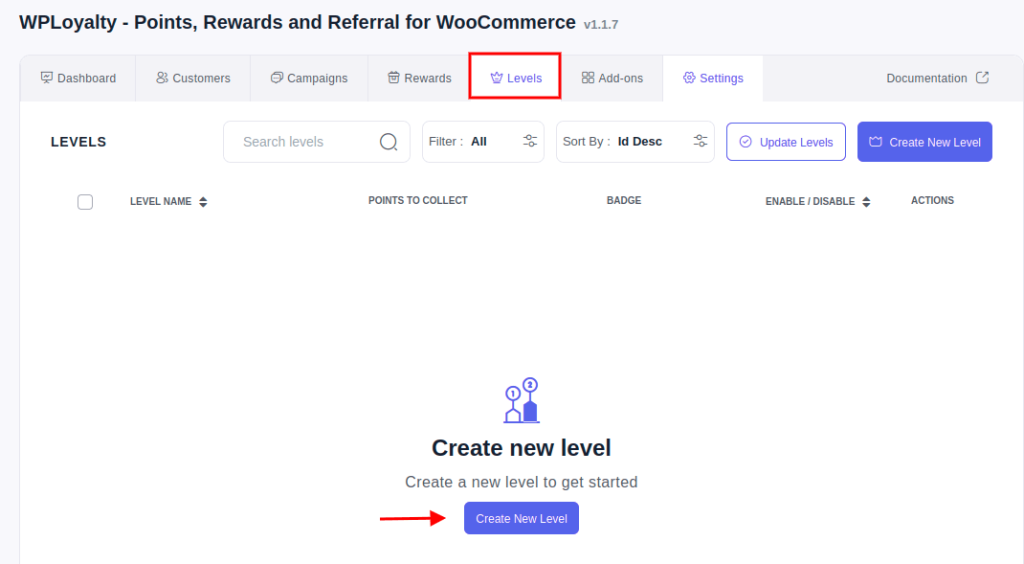
You can give different names for the levels as per your preferences.
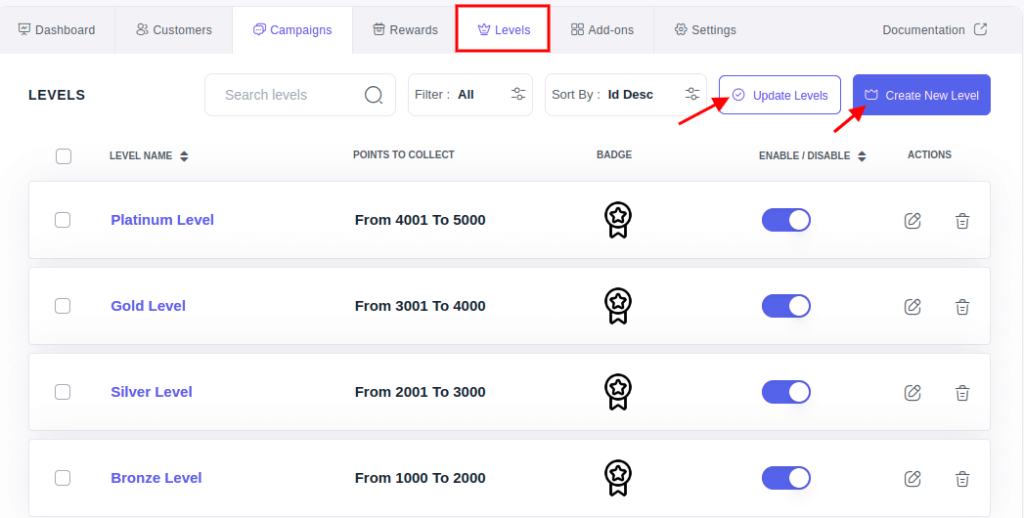
For example, let’s name the levels Bronze, silver, gold, and platinum. Your customers who earn points from 1000 to 2000 will come under the bronze level, one who earns points between 2001 to 3000 will come under the silver level, and so on.
Fill out the necessary information as shown in the picture below. Give a level name and number of points to collect, give an image to the level (optional), and Click on save and close.
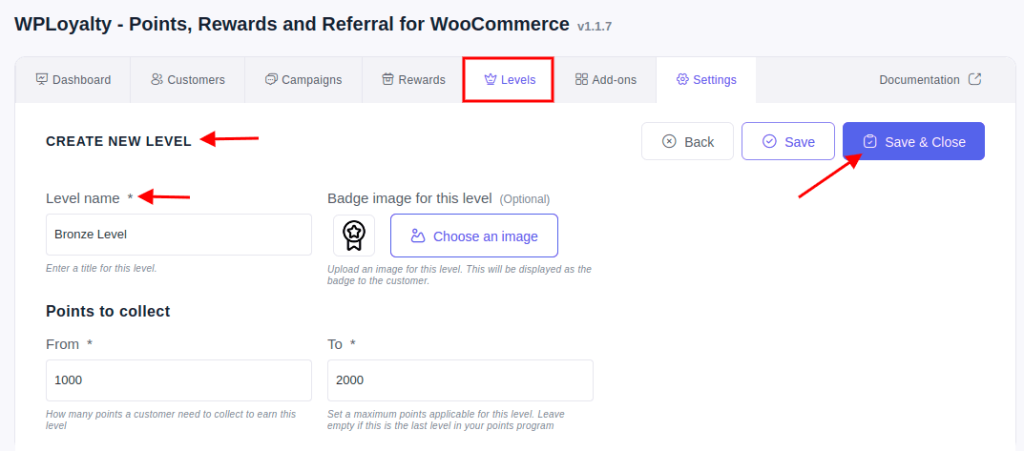
You can create any number of levels by clicking on the create a new level. Also, once you create the levels, click on the update levels. Clicking on the update levels will add the customer details successfully.
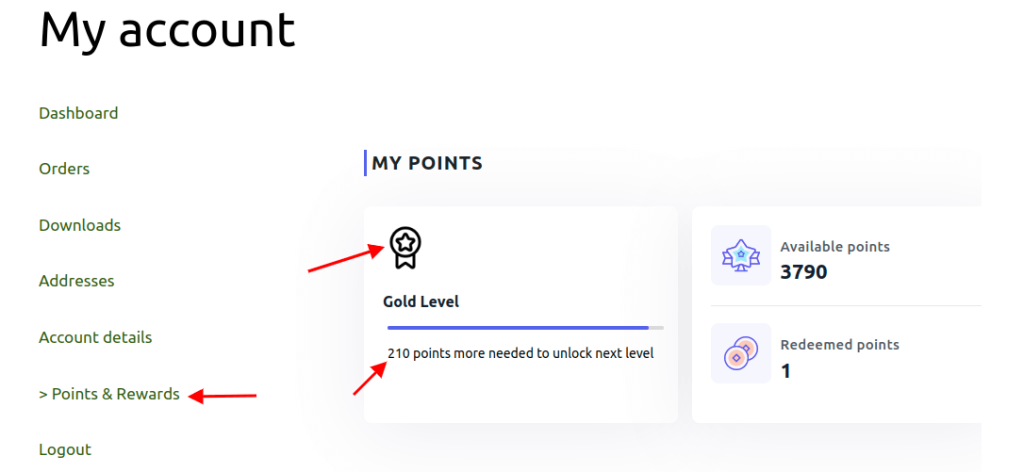
Your customer will be able to see the levels on their my account – points & rewards section. Also, your customers can see the number of points needed to unlock the next level. This will motivate them to purchase more, earn more points and reach new levels.
Example 2: Different Rewards for Customers at Different Levels.
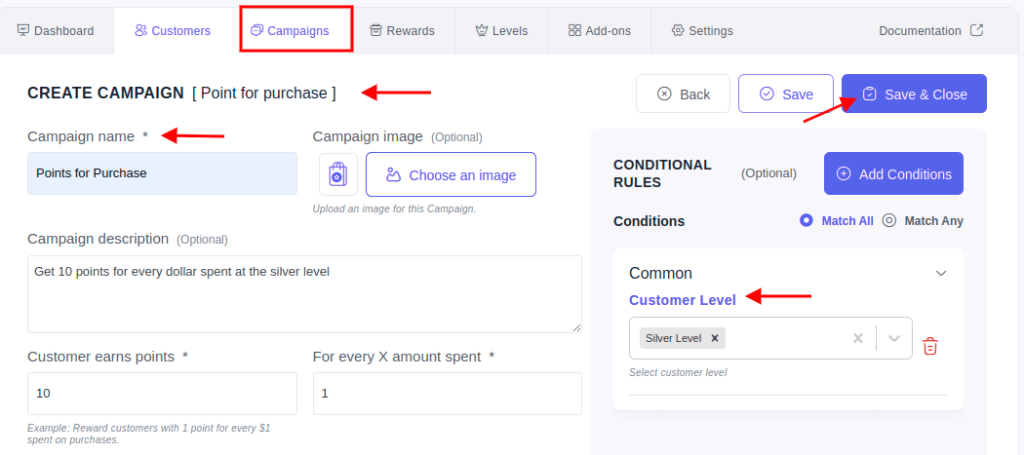
Tier 1: Silver Level – “Get 10 points for every dollar you spend”
Click on campaigns – points for purchase – fill out the details in the field and click on the conditional rule – customer level – Select ‘Silver’ and click on “Save and Close”.
Tier 2: customers at the gold level can get 20 points for every dollar spent.
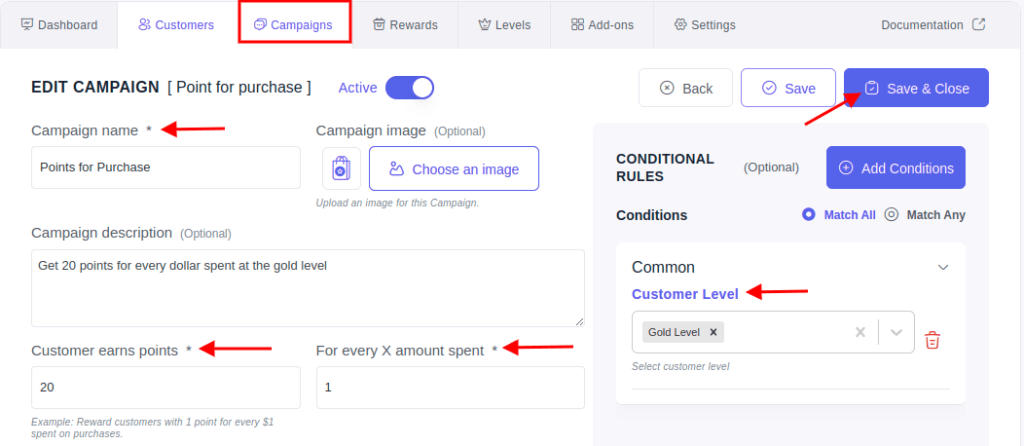
Similarly, customers at the Tier III, i.e Platinum level can get 30 points for every dollar spent, and so on.
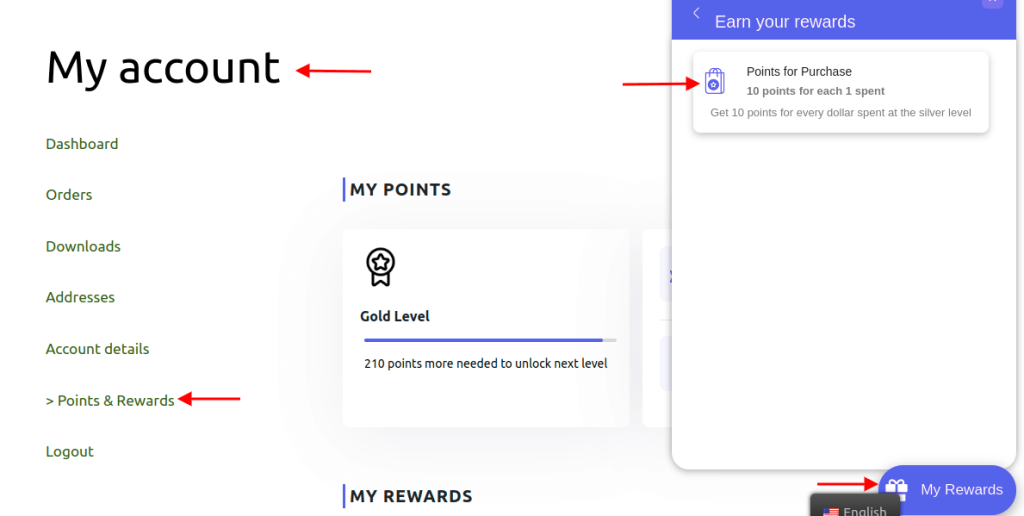
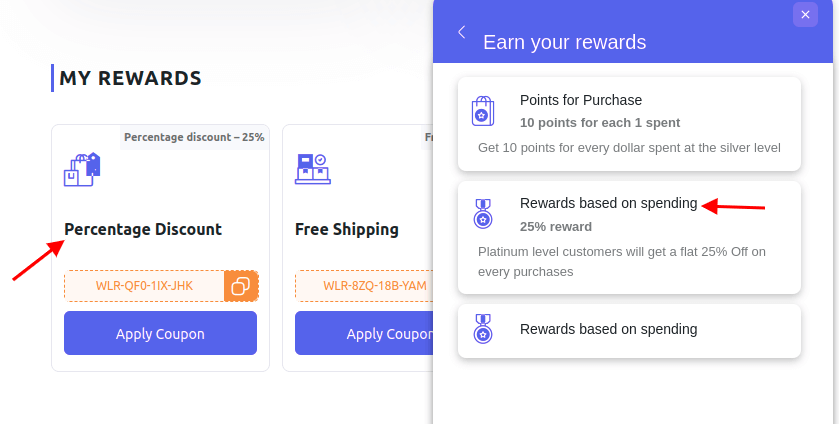
Your customers can see the rewards on my account page – points & rewards – Ways to earn rewards or click on the chat widget – earn your rewards.
Tier 3: Platinum level – “Customers will get a flat 25% off on every purchase.”
Click on rewards – create new reward – percentage discount – Fill out the details and click on “Save and Close”.
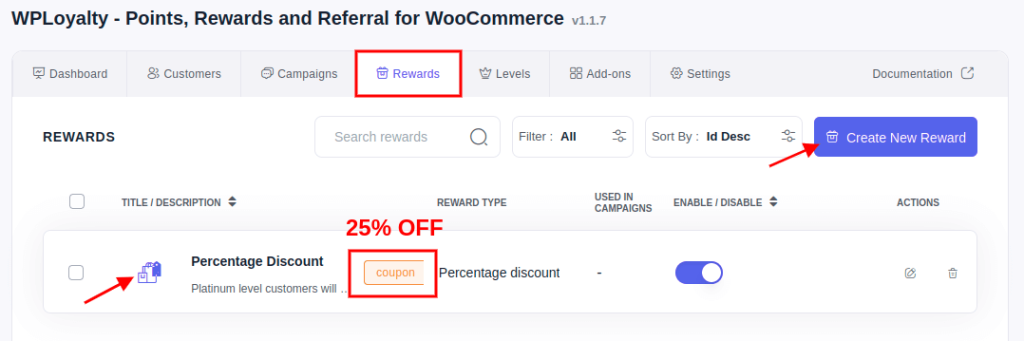
Once the reward is created, you can apply the discount to any one of the campaigns. Let’s reward based on spending campaigns, for example.
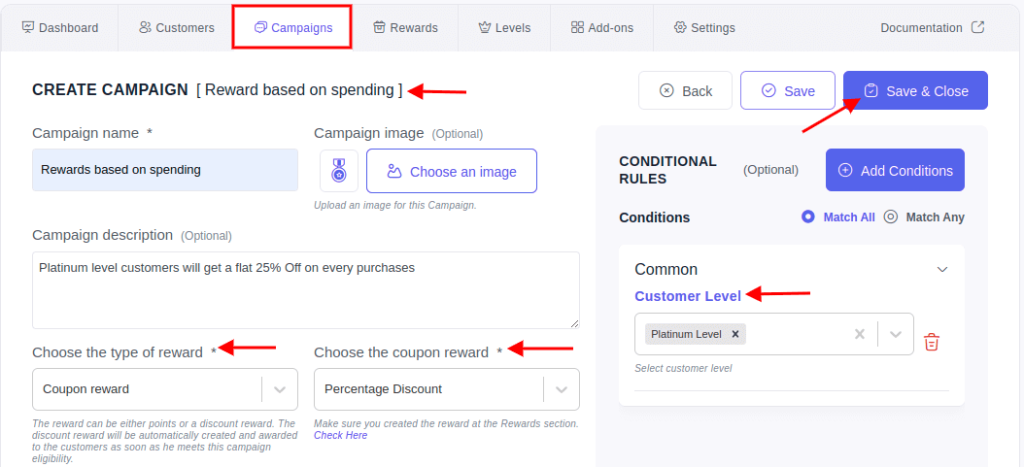
Click on campaigns – reward based on spending – give a campaign name – descriptions (optional). Choose the type of reward as ‘Coupon Reward’ – Select ‘Percentage Discount.’
Click on conditional rules – Customer level – Click on ‘Platinum’ and then save and close.
Your customers can see the rewards on my account page – points & rewards – Ways to earn rewards or click on the chat widget – earn your rewards.
Tiered Loyalty Program Examples
Discover how these brands have successfully utilized tiered loyalty programs to boost customer engagement, retention, and revenue. Gain valuable insights that you can apply to your own business strategies.
Lancome
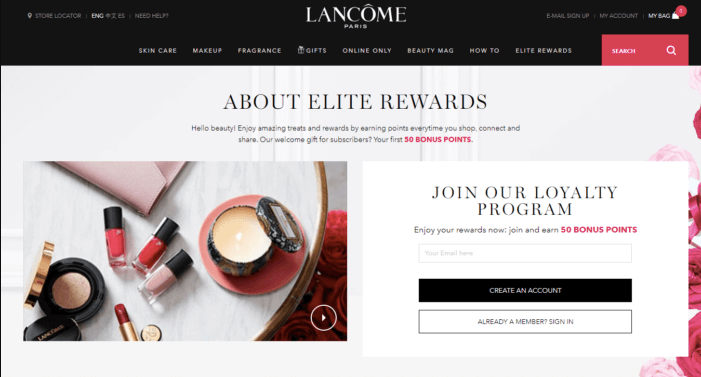
The tiered Elite Rewards Program from Lancome makes it simple for their customers to earn points. For every dollar spent, customers receive 10 points, and they also receive 50 points for following Lancôme on social media and 100 points for sharing additional personal info.
VIP Members can get early access to products, a ShopRunner membership, and invitations to Lancôme parties and events according to their membership category (Rose Gold, Gold, or Platinum).
Total Tools
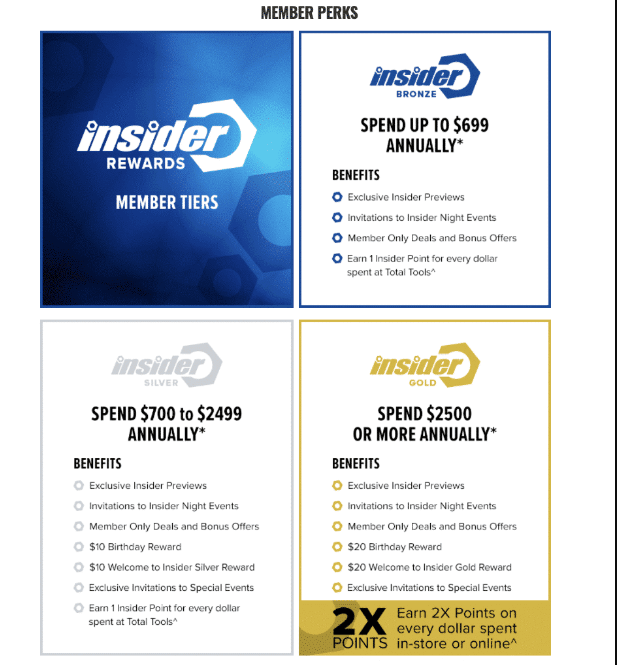
The biggest professional tool retailer in Australia is called Total Tools. When customers shop both in-person and online, loyalty members receive Insider Rewards.
The program has three tiers, Bronze, Silver, and Gold. It offers members a variety of benefits, including invitations to events, bonus offers, dollar amounts as incentives for different tiers, and special member-only discounts.
Innovasport
Customers are divided into low, medium, and high spender levels as part of their tiered rewards program, Legends, which grants them access to events and other perks like lottery tickets.
Customers can use their phones to get real-time loyalty updates, earn rewards, and obtain credit for in-store purchases by scanning a QR code.
e.l.f – Beauty Squad
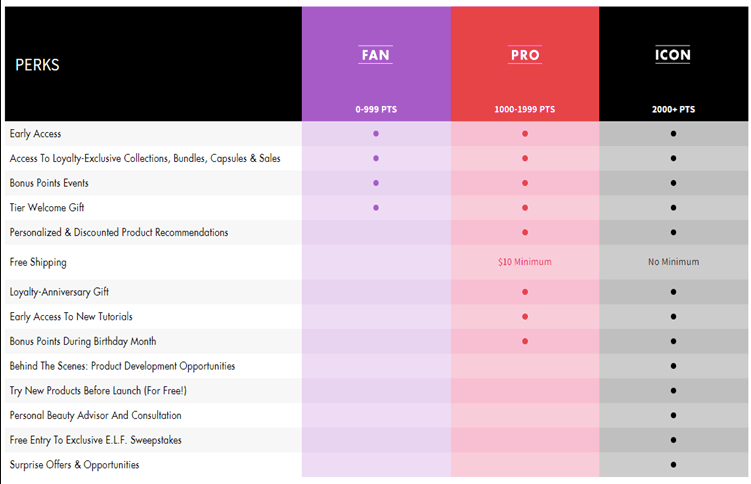
e.l.f. Beauty Squad members receive huge benefits and delightful surprises. Every e.l.f. Cosmetics purchases and a number of additional actions give Beauty Squad members points.
There are three tier levels: FAN, PRO, and ICON, and as you climb the tier ladder, more benefits become accessible to you. By sharing a picture of your receipt or online order confirmation, members can earn points for any e.l.f. Cosmetics purchases made at a merchant.
Additionally, customers can earn points by visiting e.l.f.cosmetics.com, completing their beauty profile, posting on social media, submitting a review, signing up for emails or texts, and more. Icon tier members get free shipping and free trials of new products before they go on sale.
Stay ahead of the competition and build customer loyalty. Start growing your customer base now!
Conclusion
Create a tiered loyalty program that effectively offers rewards and incentives to retain customers and build a customer base. Make sure your customers are appreciated and valued because valued customers tend to spread the word about your brand and become your brand ambassadors.
What’s helpful is to set up a tiered loyalty program that is flexible and an easy way to reward your loyal customers. Also, it must be beneficial for both the store and the customers.
Learn more about How To Reward Customers With Points For Sign Ups In WooCommerce?, How To Offer Loyalty Points For Social Shares In WooCommerce? And How Do I Give Customers Points On Their Birthdays In WooCommerce?
Frequently Asked Questions
To create a tier program, you should follow this three simple steps:
1. Start by segmenting your customers based on their purchasing behavior or loyalty.
2. Then, assign benefits or rewards to each tier based on their value.
3. Finally, communicate the program to customers and ensure seamless integration with your existing systems.
A tiered loyalty program offers several benefits for businesses, including increased customer engagement, improved customer retention, and higher average order value. By rewarding customers based on their loyalty level, businesses can incentivize repeat purchases and boost long-term relationships with their most valuable customers.
Tiered loyalty programs are attractive for customers because they offer a sense of exclusivity and progression. Customers feel motivated to reach higher tiers to unlock better rewards and benefits, creating a rewarding and engaging experience that enhances loyalty and encourages continued engagement with the brand.
To set up a tiered loyalty program, you’ll need to define the criteria for each tier, such as the number of points required to advance to the next tier, the benefits and rewards offered at each level, and the rules for maintaining each tier status. You’ll also need to determine how customers can earn points, how points are tracked and redeemed, and how the program will be promoted and communicated to customers.
A successful tiered loyalty program typically consists of three key components:
1. Clear and attainable tier criteria,
2. Enticing rewards and benefits for each tier, and
3. Effective communication and engagement strategies to keep customers informed and motivated.
These elements work together to incentivize customer loyalty and drive repeat purchases.

