


Last quarter, I audited a WooCommerce store selling handmade jewelry. The owner was spending $2,100/month on Facebook and Instagram ads. Traffic was solid — 8,400 monthly visitors. But when I checked the numbers, 74% of customers who added items to their cart left without buying. That’s roughly 1,550 abandoned carts every month. At an average order value of $68, that’s over $105,000 in potential revenue walking out the door.
She wasn’t doing anything about it. No recovery emails. No exit-intent popups. No follow-up of any kind. The abandoned carts just… vanished.
Most guides on WooCommerce abandoned cart recovery list 10 plugins and tell you to “send a reminder email.” This guide covers the complete system — why your customers abandon, how to build a multi-channel cart recovery sequence with tested email templates and how to connect recovered customers to a loyalty program so they don’t just buy once.
What Is WooCommerce Cart Abandonment?
Cart abandonment happens when a customer adds products to their WooCommerce cart but leaves your store without completing the purchase. They showed intent — they browsed, they selected, they almost bought. Then something stopped them.
Think of it like a customer in a physical store who fills a shopping basket, walks to the register, and then sets the basket down and walks out. In a physical store, you’d notice. Online, it happens silently — unless you have tracking set up.
WooCommerce doesn’t track abandoned carts by default. The built-in system only records completed orders. To capture, track, and recover abandoned carts, you need a dedicated plugin.
The global cart abandonment rate in 2026 is 70.22%, calculated across 50 different studies by the Baymard Institute. That means roughly 7 out of every 10 shoppers who add items to their cart leave without buying. For WooCommerce stores specifically, the rate sits between 70-75%, with mobile abandonment reaching 80%+ (Dynamic Yield, 2025).
Related Read: 10 Proven Ways to Reduce Cart Abandonment
The Real Cost of Cart Abandonment
Most store owners know cart abandonment exists. Few understand how much it’s actually costing them — and how much of that revenue is recoverable.
The numbers:
- $260 billion in lost orders is recoverable in the US and EU alone through better checkout design and recovery strategies (Baymard Institute)
- eCommerce retailers lose approximately $18 billion annually to abandoned carts (Dynamic Yield, 2025)
- Abandoned cart emails have a 40-45% open rate — significantly higher than standard marketing emails at 15-25% (Moosend/MobiLoud, 2026)
- 50% of users who click on an abandoned cart email complete the purchase (Moosend, 2025)
- Three-email recovery sequences recover 69% more orders than single emails (WooLentor, 2026)
Real example: The jewelry store I mentioned in the intro had 1,550 abandoned carts per month at $68 AOV. Recovering 8% (124 orders) generated $8,432/month — a 44x return on the $19/month Retainful subscription. Klaviyo’s benchmark data shows abandoned cart emails deliver $5.81 in revenue per recipient, making it the highest-ROI automated email type in eCommerce.
If you’re not running abandoned cart recovery on your WooCommerce store, every day without it is recoverable revenue lost permanently.
Related Read: How to Optimize Your WooCommerce Checkout
Why Customers Abandon WooCommerce Carts
Not all abandonment is preventable. Some shoppers are just browsing. But the Baymard Institute’s research identifies specific, fixable reasons behind most abandonment:
- 48% — Extra costs too high (shipping, taxes, fees revealed at checkout)
- 26% — Forced to create an account before purchasing
- 25% — Checkout too long or complicated (average checkout has 5.1 steps)
- 22% — Couldn’t calculate total cost upfront
- 21% — Didn’t trust the site with credit card information
- 18% — Delivery too slow
- 17% — Complicated return policy
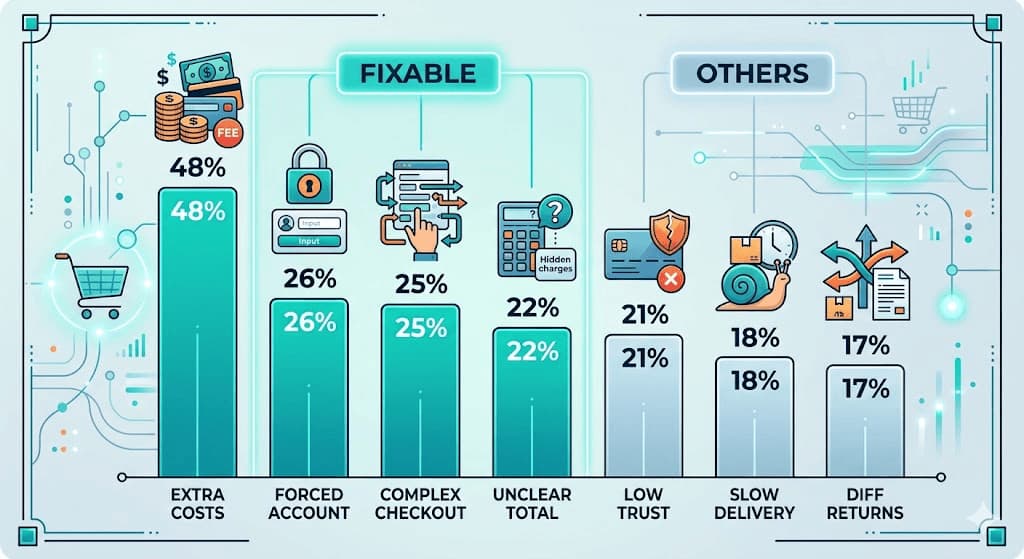
The fixable ones: Extra costs, account creation, long checkout, and unclear totals are all solvable this week. Show shipping costs on the product page. Enable guest checkout. Reduce your checkout to 2-3 steps using WooCommerce checkout optimization techniques. Display cart totals throughout — and make sure your payment gateway options cover what your customers actually use.
The ones you recover instead of prevent: Distractions, comparison shopping, and “just browsing” can’t be prevented — but they CAN be recovered with a well-timed abandoned cart email sequence. That’s what the rest of this guide covers.
Related Read: 10 Customer Retention Metrics
Why I Use Retainful (Why It Matters for Your Store)
Most abandoned cart guides recommend whichever plugin the author is affiliated with. I want to be transparent about why I chose Retainful and how it connects to the broader WPLoyalty ecosystem.
Retainful is built by the same company behind WPLoyalty and Flycart’s Discount Rules. That means three things for your store: the plugins are built to work together, the company understands both the recovery side (Retainful) and the retention side (WPLoyalty) of eCommerce, and you get one consistent support team across your entire customer lifecycle toolkit.
What Retainful does well:
- Automated abandoned cart email sequences with drag-and-drop email builder
- Guest cart tracking (captures emails from non-logged-in shoppers)
- Dynamic coupon codes (unique codes per email, not generic storewide coupons)
- Pre-built automation workflows — abandoned cart, welcome series, win-back, and post-purchase
- Omnichannel: email + SMS + WhatsApp recovery from one dashboard
- One-click cart restoration links (customer clicks the email link and their exact cart loads)
Pricing: Free plan available. Starter plan at $19/month covers up to 2,000 contacts with unlimited emails and advanced segmentation.
“Retainful – Great for small businesses looking for simple automation and guest cart tracking.” — LiquidWeb’s WooCommerce Abandoned Cart Guide, 2025
Make every recovered order count with WPLoyalty rewards.
Which WooCommerce Abandoned Cart Plugin Should You Use?
If you’re comparing cart abandonment recovery plugins for WordPress, here’s how the top 3 stack up:
Retainful – Best for WooCommerce stores that want email + SMS + WhatsApp abandoned cart recovery in one dashboard. Pre-built automation workflows, guest cart tracking, dynamic coupon codes, and a drag-and-drop email builder. Free plan available. Starter at $19/month. Same parent company as WPLoyalty and Flycart — which matters if you want your recovery and retention tools to work together. This is what I use.
FunnelKit (CartFlows) — Best for stores already using FunnelKit for checkout optimization. Strong automation builder with visual workflows. Starting at $99.50/year. Good cart tracking but no SMS/WhatsApp from the same tool — you’d need a separate integration.
WooCommerce Abandoned Cart Recovery(Official) — The WooCommerce marketplace extension at $79/year. Handles email recovery and guest capture. Simple, no-frills, and built specifically for WooCommerce. Weakness: no SMS, no dynamic coupon codes, and the email builder is more basic than Retainful’s drag-and-drop.
For a full comparison with more options, see our best WooCommerce abandoned cart recovery plugins guide.
This tutorial uses Retainful. The strategy applies to any plugin.
What You’ll Need Before Starting
- WooCommerce 8.0+ installed and active
- A Retainful account – sign up free at retainful.com. Free plan works for testing; Starter plan ($19/month) recommended for production.
- WooCommerce email settings configured — WooCommerce → Settings → Emails should have your store email and “from” name set correctly
- At least 5 products published so you have realistic test carts
⏱️ Time estimate: 25-30 minutes to set up your first abandoned cart email sequence.
How to Set Up WooCommerce Abandoned Cart Recovery (Step-by-Step)
Step 1: Install Retainful and Connect Your WooCommerce Store
What you’re doing: Adding abandoned cart tracking and email automation to your WooCommerce store.
Go to your WordPress dashboard → Plugins → Add New. Search “Retainful.” Install and activate the plugin (version 1.0.2)
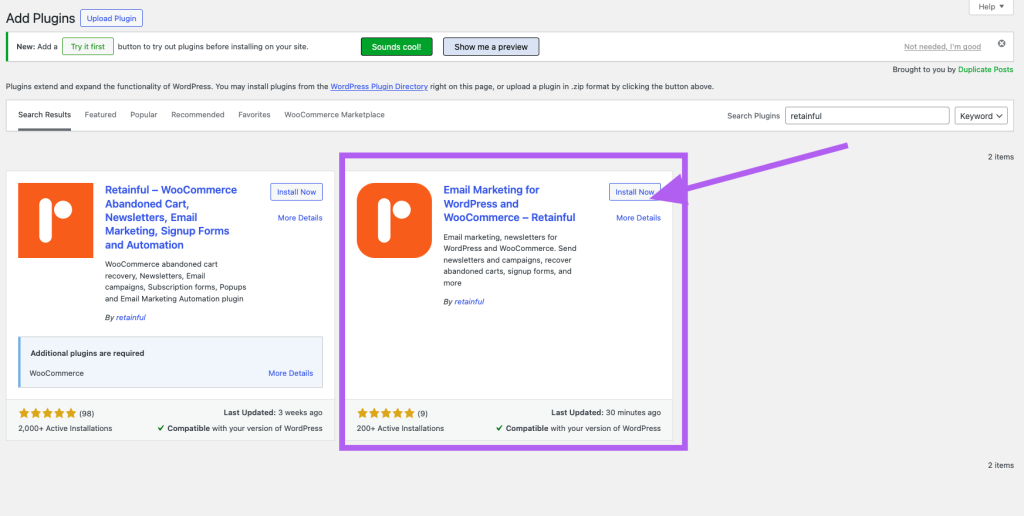
After activation, you’ll see Retainful in your left sidebar. Click it, then click “Connect to Retainful” or “Create Account.” Sign up or log in to your Retainful account. Then, in the new app, go to Integrations -> click ‘Install’ on WooCommerce. Enter your store domain, and connect the store.
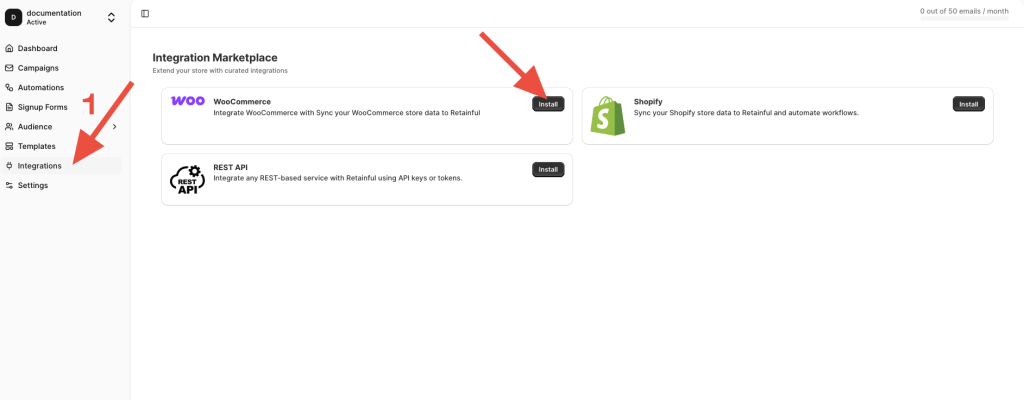
Once connected, Retainful starts capturing abandoned carts immediately. You can view the events by clicking the contact in the Audience section separately.
Related Read: speeding up your WooCommerce site
Step 2: Enable Guest Cart Capture
What you’re doing: Capturing email addresses from non-logged-in shoppers so you can recover their carts too.
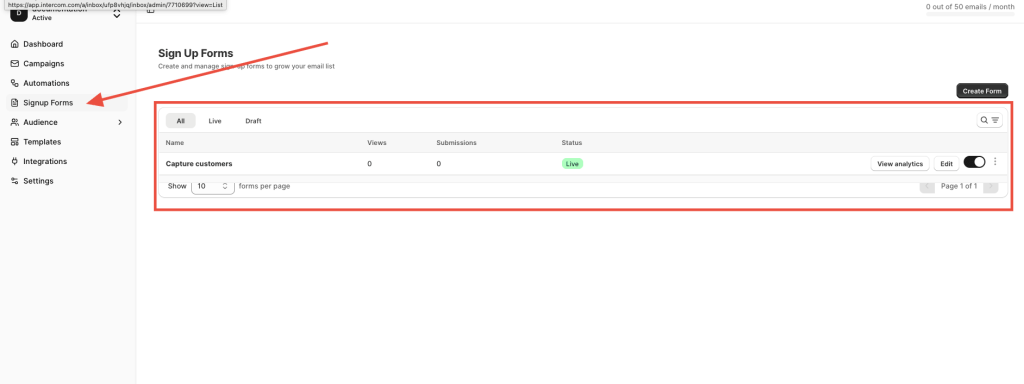
Go to Retainful → Signup forms → Enable “Add to cart” popup by creating the form.
With this enabled, Retainful shows a pop-up asking for the visitor’s email address when they add an item to their cart or reach the checkout page. If they enter their email before abandoning, you can send recovery emails even though they never created an account.
Step 3: Create Your Abandoned Cart Email Sequence
What you’re doing: Building the automated email series that sends to customers who abandon their carts.
Go to Retainful → Automations → click “Create New Workflow.” You’ll see a list of pre-built templates — Welcome Series, Post-Purchase, Win-Back, and “Abandoned Cart Recovery.” Select it.
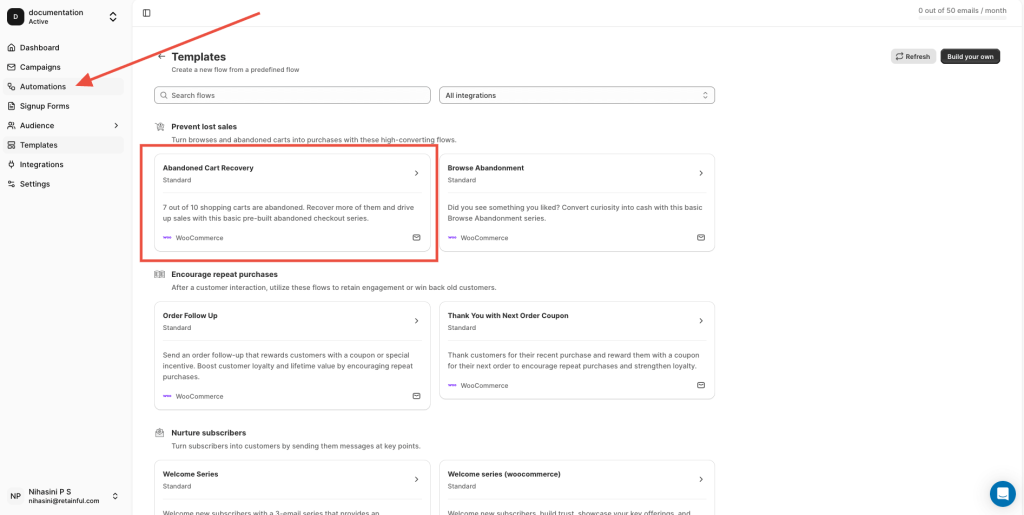
The workflow builder opens with a visual flow: a trigger node (“Customer abandons cart”) connected to email nodes via timed delays. You can drag nodes to rearrange, add delays between emails, and click each email node to customize its content.
The template comes with a 3-email sequence. Here’s the timing and content I use:
Email 1 — The Gentle Reminder (1 hour after abandonment):
- Subject: “You left something behind at [Store Name]”
- Body: Show the abandoned products with images and prices. Include a one-click “Return to Cart” button. No discount yet.
- Purpose: Catches distracted shoppers while purchase intent is still high.
Email 2 — The Value Add (24 hours after abandonment):
- Subject: “Your cart is missing you…[Customer name]?”
- Body: Reiterate the products. Add social proof (a review quote or star rating). Include a 5% discount code as a gentle nudge.
- Purpose: Addresses hesitation with social proof and a small incentive.
Email 3 — The Final Push (72 hours after abandonment):
- Subject: “Your cart expires soon — here’s 5% off”
- Body: Create urgency (“your reserved items won’t be held much longer”). Include a 5% dynamic coupon code that expires in 48 hours.
- Purpose: Converts the holdouts with urgency + a stronger incentive.
Retainful’s email builder lets you drag and drop product blocks, coupon blocks, and the “Return to Cart” button. The summary block in the email editor auto-fills with the exact products the customer left behind, including images, names, and prices.
Step 4: Set Up Dynamic Coupon Codes
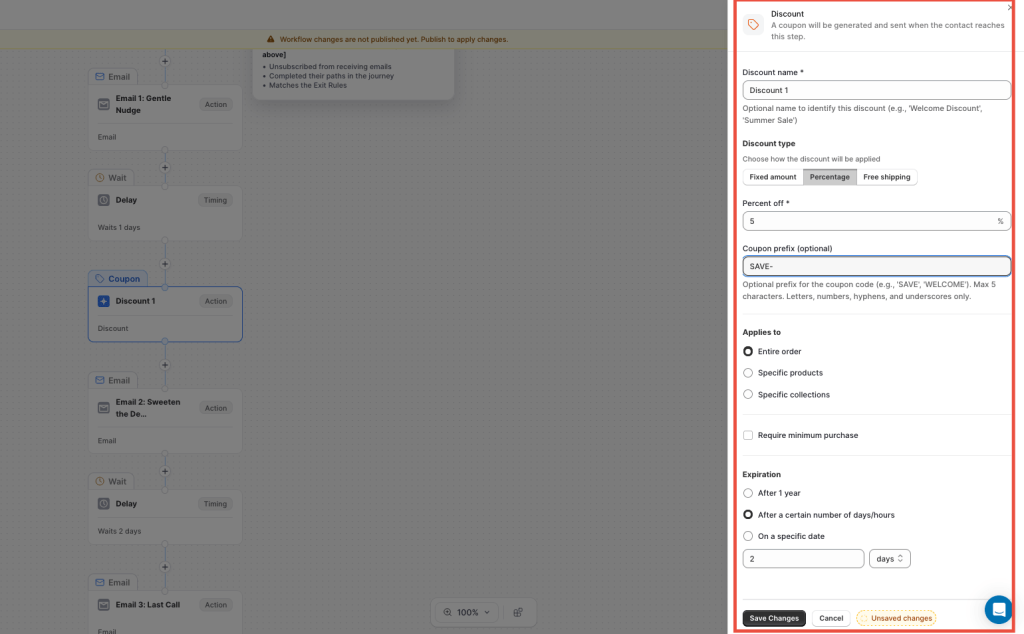
What you’re doing: Creating unique, single-use discount codes for each recovery email, so customers can’t share or reuse them. You can create a dynamic coupon in your automation itself
Go to Retainful → Automations → click any automations, drag the coupon block, and configure:
- Coupon type: Percentage discount
- Value: 5% for Email 2, 10% for Email 3 (create separate coupons for each)
- Auto-expiry: 48 hours after creation
- Auto-generate unique code: Enable this, and each customer gets a unique code like “SAVE-A7X2K” instead of a generic “SAVE10.”
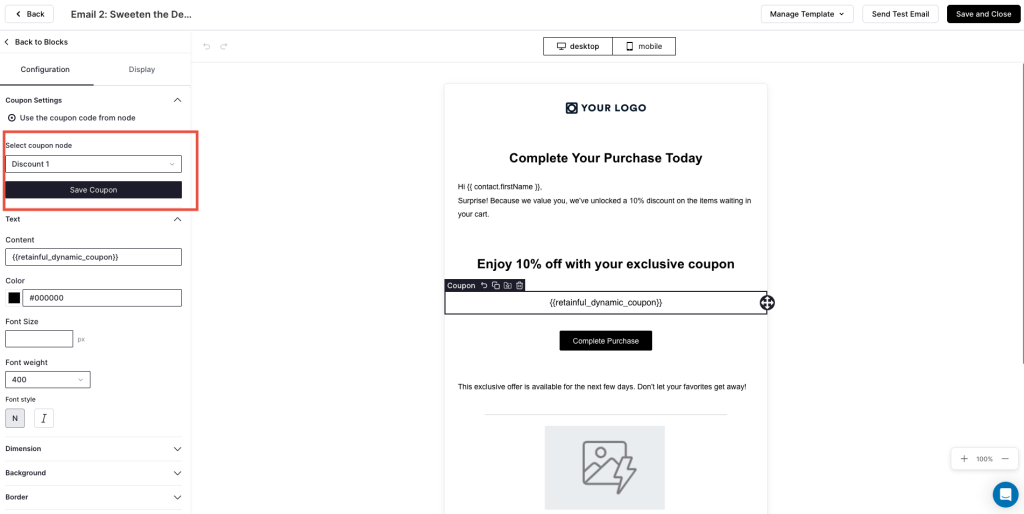
Go back to your email sequence and drag the Coupon Block into Email 2 and Email 3. Select the appropriate coupon for each in the email editor, and make sure to save the step.
Step 5: Configure Exit-Intent Popups
What you’re doing: Catching customers at the moment they’re about to leave your store with items in their cart.
Go to Retainful → Signup → Create a form. Select the “Exit Intent” trigger type.
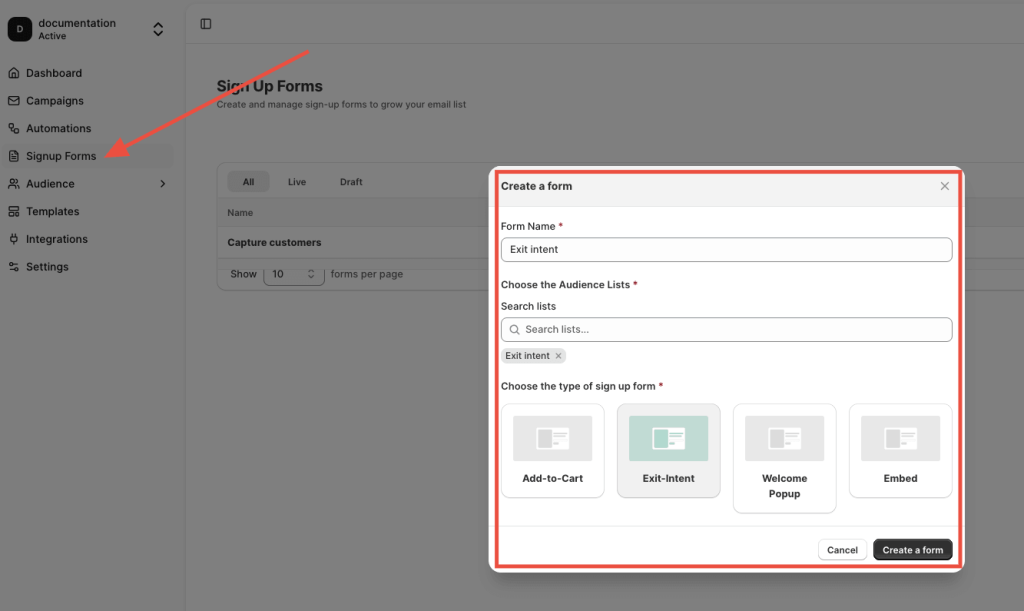
Configure the pop-up:
- Trigger: Show when the cursor moves toward the browser close button (desktop) or after 30 seconds of inactivity (mobile)
- Content: “Wait! You have items in your cart. Complete your order now and save 10%.”
- Include: An email capture field + “Apply Discount” button
- Frequency: Show once per session (don’t harass returning visitors)
Also Read: 50 Best Places to Get Birthday Freebies
Verify It’s Working
Before relying on your recovery system, run these checks:
- Abandon a test cart yourself. Add products to your cart using an incognito browser with a personal email. Close the tab. Check that you receive Email 1 within 60-90 minutes, Email 2 at 24 hours, and Email 3 at 72 hours.
- Click the “Return to Cart” link. Confirm it restores your exact cart — same products, same quantities. If it loads an empty cart, the one-click restoration isn’t configured correctly in Retainful → Settings → Cart Links.
- Test the coupon code. Apply the dynamic coupon from Email 2 or Email 3. Confirm the discount works and the coupon is single-use (try applying it again on a second order — it should fail).
- Check the Retainful dashboard. Your test should appear as an abandoned cart → recovered cart in the analytics. Confirm revenue tracking is accurate.
Pro tip: Send all 3 test emails to yourself and open them on both desktop and mobile. I’ve caught broken layouts on mobile — especially product images that stretched beyond the email container — that I never would have seen on a desktop. Retainful’s email preview shows mobile, but real-device testing is always better.
5 WooCommerce Abandoned Cart Mistakes (And How to Fix Them)
Mistake #1: Only tracking logged-in users
Default WooCommerce only records carts for customers with accounts. But the majority of your shoppers check out as guests — Baymard’s data shows 26% of abandonments happen specifically because stores force account creation. Without guest cart capture, you’re only recovering from 20-30% of your abandoning audience.
Mistake #2: Sending only one recovery email
A single “you forgot your cart” email recovers some sales. But three-email sequences recover 69% more orders than single emails (WooLentor, 2026). The first email catches distracted shoppers. The second addresses hesitation with social proof. The third converts holdouts with urgency and a discount. Skipping emails 2 and 3 is leaving recoverable revenue on the table.
Mistake #3: Leading with a discount in the first email
I tested this on a skincare store. Email 1 with a 10% discount recovered 14% of carts. Email 1 without a discount (gentle reminder only) followed by Email 2 with 5% and Email 3 with 10% recovered 12% — nearly the same rate. But the discount-first approach trained customers to abandon carts intentionally to trigger the discount.
Within two months, the store’s abandonment rate increased by 8 percentage points. The escalating approach protects your margins and your customer behavior. If you want to offer discounts strategically instead of reactively, WooCommerce discount plugins let you control who gets what and when.
Mistake #4: Using a generic coupon code everyone can share
“SAVE10” sounds convenient. But it ends up on coupon-sharing sites within days. Suddenly everyone — not just abandoners — is using your recovery discount. Use Retainful’s auto-generated unique coupon codes instead. Watch below youtube video to create the dynamic coupon in your email.
Mistake #5: Recovering the cart but not the customer
This is the biggest mistake I see: stores celebrate recovering an order but do nothing to retain that customer long-term. A recovered $68 order is nice. A recovered customer who makes 5 orders over the next year at $68 each is worth $340.
The fix: connect cart recovery to a loyalty program. With WPLoyalty, recovered customers earn points on their completed purchase. Those points drive the second purchase without another discount.
Related Read: Why Customers Ghost You After Buying Once
Advanced Cart Recovery Strategies
Strategy 1: Stack email + SMS for multi-channel cart recovery. Send the recovery email at 1 hour and an SMS at 15 minutes. SMS has a 98% open rate vs email’s 40-45%. The SMS catches customers immediately, while the email follows up with product images and details. For more on how WooCommerce push notifications fit into a multi-channel approach, see our dedicated guide.
Strategy 2: Segment recovery emails by cart value to protect average order value. A $25 cart and a $350 cart shouldn’t get the same recovery email. Create two versions: carts under $100 get a standard 3-email sequence with a percentage discount. Carts over $100 get a personalized email from the store owner with a specific dollar-off offer.
High-value cart recovery is worth the extra effort — and protecting your average order value during recovery prevents the discount from dragging down your per-order economics.
Strategy 3: Include loyalty points in recovery emails. “Complete your order and earn 50 loyalty points toward your next purchase.” With WPLoyalty’s points system, you can mention the exact points the customer will earn on their abandoned cart. This adds value beyond just the discount — they’re not just buying, they’re investing in future rewards.
Strategy 4: Time your email automation to match your audience. Don’t send recovery emails at 3 AM. Retainful lets you set “sending windows” — restrict emails to 9 AM–9 PM in the customer’s timezone. Email 1 at 1 hour is fine anytime (it’s timely), but Emails 2 and 3 should land during waking hours. Open rates increase 15-20% when emails arrive during active browsing times.
Strategy 5: Use the recovery email as a referral program entry point. Add a line in Email 3: “Know someone who’d love [Product Name]? Share your referral link and earn $10 store credit when they buy.” Through WPLoyalty, recovered customers can share referral links. The recovery email doesn’t just bring back one customer — it potentially acquires a new one too.
Real-World Abandoned Cart Recovery Results
Example 1: Jewelry store — $8,636/month from 127 recovered orders
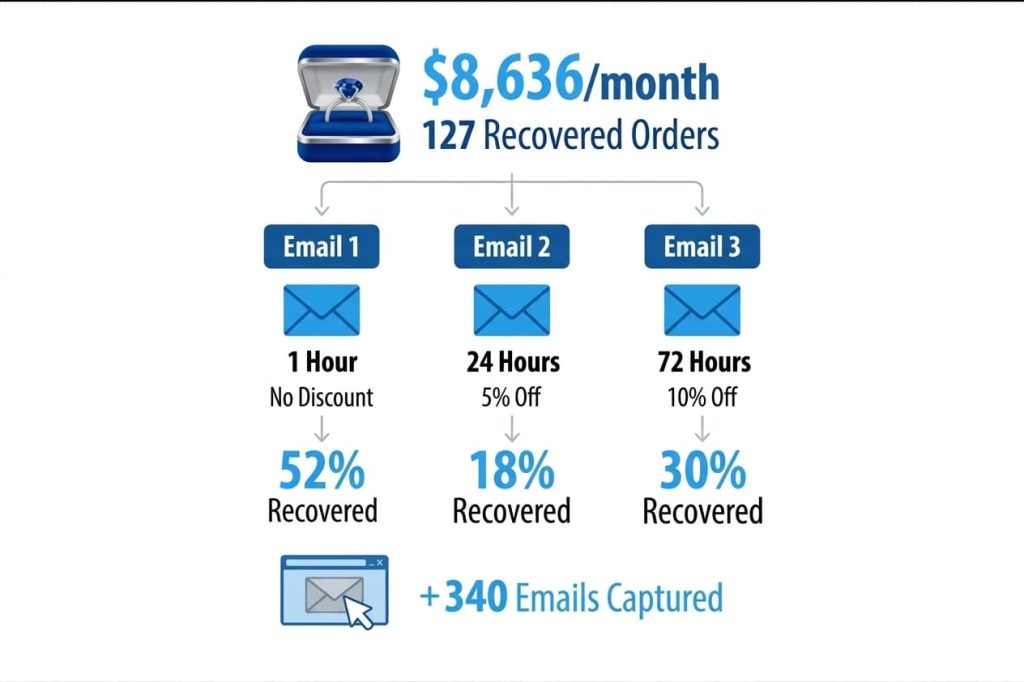
This is the store from the introduction. Key details: 8,400 monthly visitors, 74% cart abandonment rate (~1,550 abandoned carts/month), $68 average order value. The 3-email sequence through Retainful recovered 127 orders in the first month — an 8.2% recovery rate.
Email 1 (1 hour, no discount) recovered 52% of the orders. Email 2 (24 hours, 5% off) recovered 18%. Email 3 (72 hours, 10% off) recovered 30%. The exit-intent popup captured 340 additional emails, feeding the recovery pipeline.
Example 2: Pet supply store — combining cart recovery with loyalty points
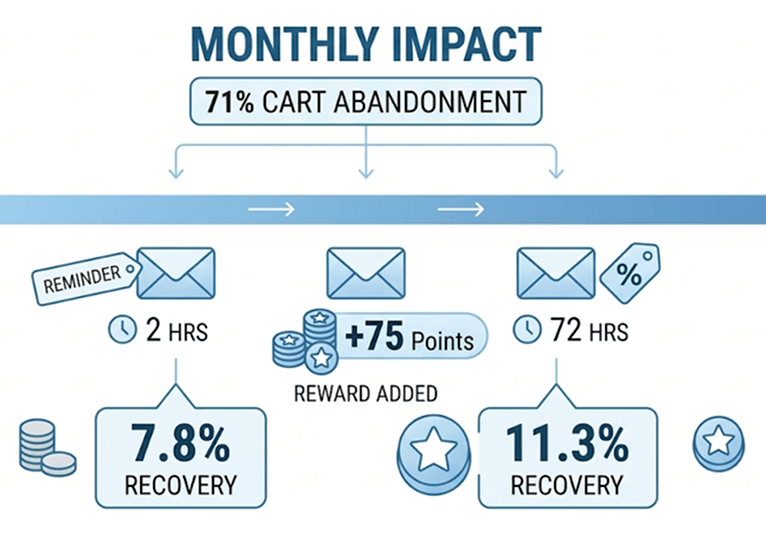
A WooCommerce store selling pet food and accessories had a 71% cart abandonment rate. They installed Retainful for recovery and WPLoyalty for retention. The recovery sequence included a line in Email 2: “Complete your order and earn 75 loyalty points — enough for free shipping on your next order.” Recovery rate: 11.3% (vs 7.8% without the loyalty mention).
More importantly, customers who were recovered with the loyalty points message had a 34% higher repeat purchase rate over 90 days compared to customers recovered with a discount-only email. The loyalty points didn’t just recover the sale — they seeded the next one.
How to Combine Cart Recovery with a Loyalty Program
Cart recovery solves the immediate problem — getting the abandoned order completed. A loyalty program solves the long-term problem — keeping that customer coming back.
1. Mention loyalty points in recovery emails. Add a block in Email 2 that shows the exact points the customer will earn: “Complete your $68 order and earn 68 loyalty points. Redeem for discounts, free products, or free shipping.” This changes the recovery email from “please come back” to “please come back AND here’s what you’ll earn.”
2. Award bonus points on recovered orders. In WPLoyalty, create a campaign that awards 2x points on orders completed through a recovery link. This rewards the customer for coming back AND accelerates their path to a reward — making the third, fourth, and fifth purchases more likely.
3. Use point expiry to create urgency beyond discounts. Instead of offering yet another coupon in Email 3, mention their existing loyalty points: “You have 120 points expiring in 14 days — that’s $12 in store credit you’ll lose. Complete your cart and add to your balance.” This works especially well for returning customers who already have an active points balance.
4. Add a loyalty launcher widget to the restored cart page. When a customer clicks “Return to Cart” from the recovery email, they land on the cart page. If WPLoyalty’s launcher widget is visible there — showing their points balance and available rewards — it reinforces the value of completing the purchase. The cart recovery email got them back. The loyalty widget seals the deal.
5. Connect recovered customers to a referral program. A customer who almost abandoned but came back and bought is a customer who now has a positive experience to share. In the order confirmation email, include a referral link: “Love your purchase? Share with a friend — you earn $10, they get 10% off.” Through WPLoyalty’s referral system, one recovered cart can generate a second customer.
Don’t just recover sales — build loyalty with WPLoyalty
What to Do Next
You now have an abandoned cart recovery system running on your WooCommerce store. Emails are sending automatically. Carts are being recovered. But recovery alone catches people who were already leaving.
Loyalty programs boost retention 15-35% when combined with marketing channels like email recovery (Marketing LTB, 2025). Retainful handles the recovery. WPLoyalty handles the retention.
🔷 Install WPLoyalty free and set up your first loyalty campaign — award points for every purchase, review, or referral. It takes under 10 minutes. Then mention those points in your Retainful recovery emails for a system that recovers carts AND retains customers.
Keep Reading:
- Best WooCommerce Subscription Plugins
- How to Increase WooCommerce Customer Loyalty
- WooCommerce Gamification
- YITH WooCommerce Points and Rewards Alternatives
- Build a Privacy Compliant WordPress Website
Frequently Asked Questions
Not effectively. WooCommerce doesn’t track abandoned carts by default — it only records completed orders. You need a plugin like Retainful or the official WooCommerce Abandoned Cart Recovery extension ($79/year) to capture, track, and email abandoning customers.
Retainful for stores wanting email + SMS + WhatsApp recovery with guest cart capture and dynamic coupons from one dashboard. It’s built by the same company as WPLoyalty, so the two integrate naturally.
Three. Email 1 at 1 hour (reminder, no discount). Email 2 at 24 hours (social proof + 5% off). Email 3 at 72 hours (urgency + 10% off). Three-email sequences recover 69% more orders than single emails. More than 4 emails increases unsubscribes without proportional recovery.
Average stores recover 3-5%. Top performers reach 10-14%. If you’re below 3%, check your email deliverability, subject lines, and whether guest cart capture is enabled.
No. I tested this across two stores — leading with a discount trained customers to abandon carts intentionally to trigger the coupon. The escalating approach (no discount → 5% → 10%) recovers nearly the same number of carts without conditioning deal-seeking behavior.
Yes — and you should. With WPLoyalty, mention loyalty points in recovery Email 2: “Complete your order and earn 68 points.” Recovered customers who see a points incentive have higher repeat purchase rates than those recovered with discounts only.

