

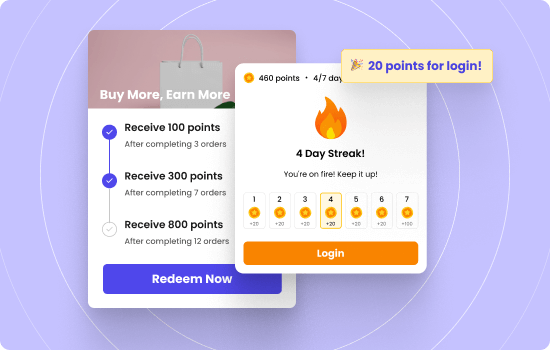

Discounts train customers to wait. Gamification trains customers to return.
WooCommerce gamification adds game rules to your store so people earn points, unlock badges, move up VIP tiers, and claim rewards as they shop. You turn normal actions like buying, reviewing, and referring into progress customers can see.
This guide shows you the exact mechanics, campaign ideas, rule examples, and tracking that make a gamified WooCommerce loyalty program work. You will learn how to set points, design tiers, reward referrals, and protect profit.
Increase your ROI upto 20X with WPLoyalty’s customized gamification campaigns and reward your loyal customers.
What is Called WooCommerce Gamification?
WooCommerce gamification is the method of adding game elements to your WooCommerce store so customers earn points, unlock badges, move up tiers, and redeem rewards for actions like buying, reviewing, and referring.
Gamification fits WooCommerce best when you run it through a loyalty program. A WooCommerce loyalty program gives you the rules engine you need to reward behavior, track progress, and deliver benefits at the right time.
Here is what a gamified WooCommerce loyalty program includes.
- Points for actions like purchases, reviews, referrals, and account signup
- Rewards customers can redeem, like coupons, free shipping, or store credit
- VIP tiers that improve benefits as customers earn more points
- Badges that mark achievements, like first order or five reviews
- Progress visibility on product pages and in My Account so customers notice the game
This differs from a managing basic loyalty program. WooCommerce gamification keeps the customer engaged after checkout because they still have progress and rewards to claim.
5 Elements to Create a Gamified WooCommerce loyalty program
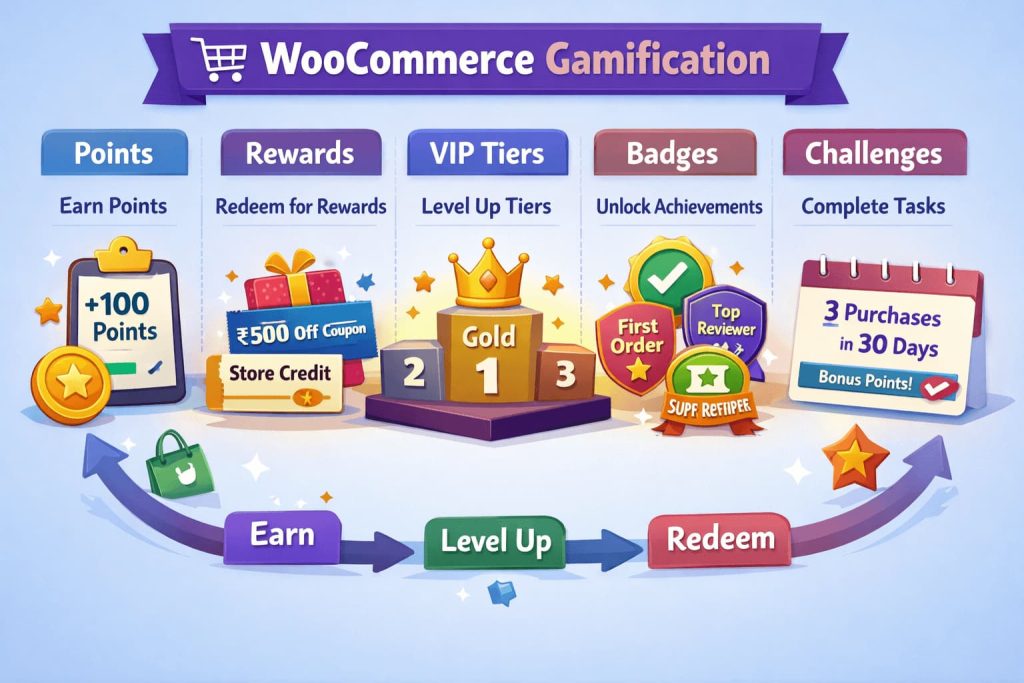
Points system
A WooCommerce points system gives points for actions you want more often. You attach points to purchases first, then add points for high trust actions like reviews and referrals.
Examples you can run:
- Points for purchase: Give 10 points for every ₹100 spent
- Points for reviews: Give 50 points for a verified product review
- Points for signup: Give 25 points when a customer creates an account
- Points for referral: Give 200 points when a referred customer completes a paid order
Keep the earning retention rate predictable. Customers hate surprise point math.
Rewards and redemption
Rewards turn points into something customers want. You decide the reward catalog, the redemption value, and the rules that protect profit.
Examples you can run:
- Money off coupon: Redeem 500 points for ₹250 off
- Free shipping: Redeem 300 points for free shipping on the next order
- Free gift: Redeem 800 points for a free sample item
- Store credit: Redeem 1000 points for ₹500 store credit
Add simple limits so rewards do not stack into huge discounts.
- Set a minimum cart total for redemption
- Allow only one reward per order
- Block redemption on already discounted sale items if needed
VIP tiers and levels
WooCommerce VIP tiers give increased customer lifetime value and a reason to stay loyal to one store. Tiers work because they feel like progress and status, not just discounts.
Examples you can run:
- Bronze at 0 to 199 points
- Silver at 200 to 499 points
- Gold at 500 to 999 points
- Platinum at 1000 plus points
Add tier benefits that feel real.
- Higher earn rate: Gold earns 1.5x points on every purchase
- Tier only perk: Platinum gets free shipping always
- Tier only reward: Silver can redeem a special coupon once per month
- Early access: Gold gets early access to new products
Make the first tier easy to reach. It creates momentum.
Badges and achievements
Badges make progress visible. They also reward loyal customers for small wins that keep them engaged between purchases.
Examples you can run:
- First Order badge after the first purchase
- Reviewer badge after 3 reviews
- Referrer badge after 1 successful referral purchase
- VIP Shopper badge after 10 orders
- Big Spender badge after crossing ₹25,000 lifetime spend
Use badges as signals. You can show them in My Account and on customer profiles if your brand fits it.
Challenges and streaks
Challenges add urgency without discounts. You set a short goal window and reward completion. Customers like clear targets because they know what to do next.
Examples you can run:
- 3 orders in 30 days: Earn 300 bonus points
- Spend ₹5,000 this month: Earn 2x points on the next order
- Write 2 reviews this month: Earn a 10 percent reward coupon
- Refer 1 friend who buys: Unlock a free shipping reward
Keep challenge rules short and time boxed. Customers act faster when they see a deadline and a clear reward.
Gamified Campaigns You Can Run in WooCommerce
WooCommerce does not include WooCommerce gamification features by default. It does not give you a built in WooCommerce points system, WooCommerce badges, WooCommerce VIP tiers, or a WooCommerce rewards program.
WooCommerce focuses on catalog, cart, checkout, orders, and basic coupons.
That is where plugins come in. A WooCommerce points and rewards plugin like WPLoyalty helps you add gamification campaigns to your store.
Below are the most useful WooCommerce gamification campaigns. Each one fits a clear store goal.
Points for purchase campaign
This is the base of every WooCommerce points system. You reward every order with a simple earning rate so customers expect points on every purchase.
Examples you can run:
- Earn 10 points per ₹100 spent
- Earn 2x points on selected categories with high margin
- Earn bonus points on the second order within 14 days
Rules that keep it clean:
- Award points only on paid orders
- Block points on gift cards if needed
- Cap points per order if your products have thin margins
Rewards based on spending campaign
This campaign increases average order value. You set cart targets and give a better reward when customers hit the target.
Examples you can run:
- Cart over ₹2,000 gets 150 bonus points
- Cart over ₹5,000 gets a free shipping reward
- Spend ₹10,000 in 30 days and unlock a Gold only coupon
Rules that protect profit:
- Set a minimum cart total to redeem
- Allow one reward per order
- Exclude sale items if your discounts already run there
Referral rewards campaign
This campaign helps you to reduce customer acquisition costs swiftly. You reward both the referrer and the referred customer so the new buyer feels welcome and the referrer feels valued.
Referral Examples you can run:
- Referrer gets 300 points after the friend completes a paid order
- Friend gets 10 percent off on the first order or 200 points on signup
- Bonus referral rewards when the friend places a second order within 30 days
Rules that reduce abuse:
- Reward only after order status becomes completed
- Block self referrals by matching email and IP when possible
- Set a monthly cap like 5 rewarded referrals per customer
Review rewards campaign
This campaign increases social proof and improves conversion on product pages. You reward verified buyers for writing useful reviews, not one line comments.
Examples you can run:
- 50 points for a verified review
- Extra 50 points when the review includes an image
- Monthly badge for top reviewers
Rules that maintain quality:
- Reward one review per product per customer
- Require a minimum length like 50 characters
- Award points only after a moderator approves the review if you need control
Signup rewards campaign
This campaign grows accounts and helps you keep customer history tied to a profile. It also improves future retention because customers can track points, tiers, and rewards in My Account.
Examples you can run:
- 25 points on account creation
- 50 points after email verification
- Profile completion badge with a small reward
Rules that stop throwaway signups:
- Give the full reward only after email verification
- Limit one signup reward per email domain pattern if abuse appears
- Delay the reward until the first paid order for high risk stores
Birthday rewards campaign
This campaign drives predictable repeat purchases. It works because it feels personal and it creates a reason to buy now.
Examples you can run:
- Birthday coupon valid for 7 days
- 200 bonus points on any order placed during the birthday week
- Tier based birthday rewards like Silver gets 10 percent off and Gold gets 15 percent off
Rules that keep it smooth:
- Ask for birthday during signup or in My Account
- Set expiry so rewards do not stay open forever
- Prevent edits close to the birthday date to stop gaming
Social share and follow campaign
This campaign increases reach, but you must cap it. Social actions are easy to fake, so you keep rewards small and tie them to real behavior.
Examples you can run:
- 10 points for sharing a product page
- 20 points for following your brand page
- Bonus badge for sharing three times in a month
Rules that protect you:
- Cap points per week
- Reward only logged in users
- Make the reward small so abuse does not hurt margins
Achievement campaign
This campaign builds habits and keeps customers engaged between orders. You reward progress milestones like levels or daily logins that feel like wins.
Examples you can run:
- First order badge and 100 points
- Three orders in 60 days and 300 bonus points
- Spend ₹20,000 lifetime and unlock a VIP tier upgrade
Rules that make it feel fair:
- Show progress in My Account
- Keep achievement names simple
- Reward meaningful milestones, not random tasks
Gamified campaign ideas most stores skip, but they work
Here are some useful points and rewards campaign ideas:
- Point expiry push campaign: send a reminder when points expire in 14 days and offer a small redemption bonus if they redeem now
- Tier accelerator week: run 2x points only for customers who are within 20 percent of the next VIP tier
- Win back mission: if a customer has not purchased in 60 days, give a limited reward that activates only after they add to cart
- Category based missions: reward bundles of categories that improve margins, like buy from Category A and B in the same month
- Post purchase streak: reward the second order within 21 days, then reward the third order within 45 days
Increase your ROI upto 20X using WPLoyalty’s pre-built loyalty campaigns and rewards your customers with points and discounts.
How to Setup gamification in WooCommerce
To set up gamification in your WooCommerce store,
- Install and activate WPloyalty plugin
- Set up the points system
- Configure the redemption rewards
- Launch one campaign, not five
- Add tiers after customers understand points
- Add badges and achievements last
Step 1: Install and activate WPloyalty plugin
The initial step is to download the WPLoyalty plugin. Once downloaded, please ensure you have installed and activated the WPLoyalty plugin.
A step-by-step guide for both installing and activating the WPLoyalty plugin can be found in the documentation.
Note: WPLoyalty provides 12+ loyalty campaigns and 5 reward types. You can choose your gamification campaigns according to your needs.
Step 2: Set up the points system
Start with one earning rule tied to purchases. Keep the rate simple so customers can calculate points in their head.
Example:
- Earn 10 points per ₹100 spent
Add only one or two extra earning actions at first.
- Signup points
- Review points for verified buyers
Step 3:Configure the redemption rewards
Customers need a reason to care about points. Add a small reward and a bigger reward so every customer finds a target.
Example reward ladder:
- 300 points for free shipping
- 500 points for ₹250 off
- 1000 points for ₹500 off
Add these limits from day one:
- One reward per order
- Minimum cart total for redemption
- No stacking with other coupons when it hurts margins
Step 4: Launch one campaign, not five
Pick the campaign that matches your biggest problem.
Use this match:
- Low repeat rate: run a second order bonus campaign
- Low order value: run a spend threshold campaign
- Low trust on product pages: run a review rewards campaign
- Need to acquire new customers: run a referral rewards campaign
- High churn rate: run a tiered loyalty campaign
Keep the campaign live for at least 90 days so you can measure impact.
Step 5: Add tiers after customers understand points
Tiered programs work best when people already value points. Add 3 or 4 tiers and attach clear benefits.
Start simple:
- Silver unlocks free products
- Gold unlocks free shipping
- Platinum unlocks a high percentage discounts
Step 6: Add badges and achievements last
Badges add fun and visibility. Add them after your points and tiers run smoothly.
Start with badges that support store goals:
- First order
- Third order
- First review
- First referral purchase
On Site Placement that Makes Customers Notice the Gamification
WooCommerce gamification works only when customers see it while they shop. You need to show points, rewards, and progress in the places where customers make decisions. You also need short labels that explain value fast.
Product page points preview
Show earnable points near the price and add to cart button. Customers decide faster when they know they earn something on this purchase.
Placement ideas:
- Near price: “Earn 120 points with this order”
- Near add to cart: “You are 80 points away from free shipping”
- Under product options: “Gold members earn 1.5x points”
Cart and checkout points messaging
Cart and checkout are where customers change cart size. Use simple progress messages that push a clear next step.
Placement ideas:
- Cart notice: “Add ₹400 more to earn 100 bonus points”
- Checkout note: “Redeem 500 points for ₹250 off this order”
- Shipping line: “Use 300 points for free shipping”
Keep messages short. Keep one goal per message.
My Account progress view
My Account is the home for your WooCommerce loyalty program. Customers come here to check points balance, rewards, tiers, and badges. You should show progress with simple visuals so customers feel momentum.
What to show:
- Current points balance and next reward target
- Current tier and points needed for the next tier
- Earned badges and the next badge target
- Available rewards and expiry dates
Homepage and email placement
Use small banners on the homepage and in order emails. These placements remind customers after checkout that they still have progress and rewards.
Placement ideas:
- Homepage strip: “Join and earn points on every order”
- Order email line: “You earned 180 points. Redeem from your account”
- Reminder email: “Your points expire in 14 days”
Get started with WPLoyalty’s easy-to-use gamification campaigns reward your loyal customers
Conclusion and next steps
WooCommerce gamification works when you keep rules clear and progress visible. You start with a simple points system, add rewards customers want, then introduce tiers and badges once the basics run smoothly. You protect profit with caps, redemption limits, and expiry.
Use this 7 day plan to launch fast.
- Set one earning rule for purchases and one rule for reviews or signup
- Create two rewards, one small and one meaningful
- Add points visibility on product page, cart, checkout, and My Account
- Launch one campaign, based on your biggest store goal
- Add points expiry and two reminder messages
- Track repeat purchases, redemption rate, and tier upgrades, then refine rules

